
Build Your Own Proxy Server on Linux and Windows in 3 Minutes (Practical 2026 Guide)
Engineering teams, automation specialists, and e-commerce growth operators frequently encounter a common set of network bottlenecks:
- Legacy automation tools expect local endpoints: Web scrapers, commercial desktop tools, or custom Python scripts often lack support for complex, long upstream usernames and passwords—they only accept a plain
127.0.0.1:8080endpoint; - Credential leakage across teams: When multiple engineers or operators share paid upstream proxy pools, distributing master credentials across individual laptops introduces security exposure and operational churn whenever passwords rotate;
- Private subnet machines require an outbound bridge: Cloud instances or internal test rigs residing on private LAN subnets need a designated jump host or gateway to route outbound internet requests cleanly.
Historically, solving this meant deploying Squid, Dante, or configuring Nginx stream modules on Linux. Anyone who has configured these knows the friction: debugging obscure ACL rules, troubleshooting authentication files, and fighting port forwarding issues can easily consume half a working day—with the lingering risk of accidentally creating an open relay probed by malicious internet bots.
In 2026, setting up a robust, dual-protocol proxy gateway no longer requires complex YAML files or legacy configurations. This practical guide walks through deploying JoyProxy Server, a lightweight, single-binary gateway for Linux and Windows, spinning up a customized HTTP / SOCKS5 proxy in under 3 minutes, and verifying connections with JoyProxy Tester and the JoyProxy Android client.
Architectural Overview: How a Lightweight Proxy Gateway Works
The gateway is distributed as a standalone, zero-dependency compiled binary. It functions as an intelligent transit router positioned between client workloads and upstream networks:
+-------------------+        HTTP / SOCKS5         +------------------------+
| Client / Device   | --------------------------> | Your Proxy Server      |
| (Scripts / Phones)|     (Plain / Whitelisted)   | (JoyProxy Server)      |
+-------------------+                             +------------------------+
                                                               |
                                                 Upstream relay with injected auth
                                                               v
                                                   +------------------------+
                                                   | JoyProxy Residential / |
                                                   | Dedicated ISP Upstream |
+------------------------+- Dual-Protocol Support: Accommodates standard HTTP CONNECT tunnels and SOCKS5 on a single port or dedicated ranges;
- Authentication Decoupling: Local client apps connect password-free or via IP whitelisting, while the gateway transparently injects upstream credentials into egress requests;
- Zero Configuration Files: No external dependencies, databases, or runtime interpreters required. Manage behavior via a single CLI invocation or a clean desktop GUI.
Part 1: Quick Deployment on Linux (CLI in 60 Seconds)
Whether running on AWS EC2, DigitalOcean, Linode, or any Linux VPS, deployment takes under a minute.
1. Download the Prebuilt Binary
Download the compiled Go binary directly from GitHub Releases without installing Python or Node.js runtimes:
# 1. Download the Linux amd64 prebuilt binary
curl -L -o joyproxy https://github.com/joyproxy/joyproxy-server/releases/download/v2.3/joyproxy-linux-amd64

# 2. Grant execution permission and move to system PATH
chmod +x joyproxy
sudo mv joyproxy /usr/local/bin/joyproxy
Legacy Distro Compatibility: For older systems such as CentOS 7.x running glibc 2.17+, download the dedicated archive
joyproxy-centos7-linux-amd64.tar.gzfrom Releases for instant compatibility without glibc dependency errors.
2. Common Startup Configurations
The server's operational engine runs under the sps subcommand:
Scenario A: Local LAN Unauthenticated Hop
Allows local or private subnet machines to connect to port 8080 without credentials:
joyproxy sps -S http -p ":8080" -g "YOUR_PUBLIC_IP"Scenario B: Upstream Relay with Credential Injection (Ideal for Web Scraping)
Clients connect to local port 8080 without credentials. The gateway automatically injects upstream credentials and forwards traffic to JoyProxy rotating or static residential endpoints:
joyproxy sps -S http -p ":8080" -g "YOUR_PUBLIC_IP" \
  -parent "http://username:password@gate.joyproxy.com:9001"
Scenario C: Enforce Client Authentication
When deploying on public-facing cloud servers, protect the gateway by requiring username and password verification:
# Start proxy with custom auth endpoint verification
joyproxy sps -S http -p ":8080" -g "YOUR_PUBLIC_IP" \
  --auth-url "https://api.yourdomain.com/auth"
3. Background Daemon and Process Management
Avoid leaving interactive terminal sessions open. JoyProxy includes native daemon controls to maintain background execution with crash recovery:
# Run in background (--daemon) with auto-restart on exit (--forever)
joyproxy sps -S http -p ":8080" -g "YOUR_PUBLIC_IP" --daemon --forever
To integrate with standard Linux systemd, create /etc/systemd/system/joyproxy.service:
[Unit]
Description=JoyProxy Gateway Service
After=network.target

[Service]
Type=simple
ExecStart=/usr/local/bin/joyproxy sps -S http -p ":8080" -g "YOUR_PUBLIC_IP" --no-detach
Restart=always
RestartSec=5

[Install]
WantedBy=multi-user.target
Enable and start the service with sudo systemctl enable --now joyproxy for persistent background operation across server reboots.
Part 2: Windows Setup (One-Click Desktop GUI)
For temporary testing nodes on Windows workstations or overseas Windows Servers, running a command prompt is entirely optional. Use the visual interface joyproxy-gui.exe.
- Download
joyproxy-gui.exefrom GitHub Releases; - Run the portable executable without installation:
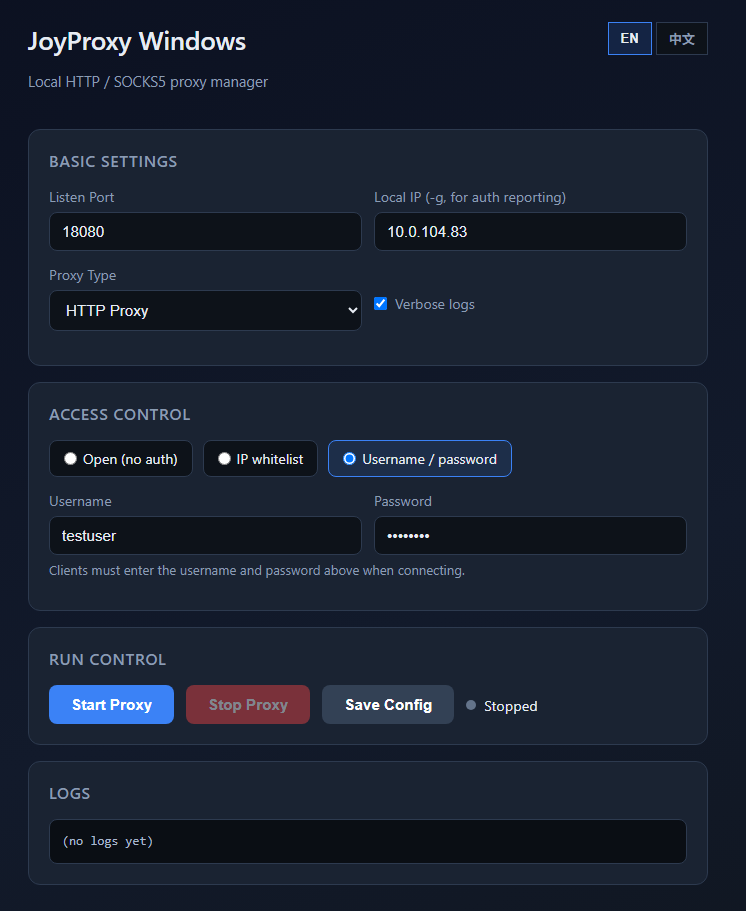
Within the window, customize your parameters:
- Listen Port: Set your desired port, such as
8080; - Local IP: Select
0.0.0.0to permit connections from external LAN machines, or127.0.0.1for local-only access; - Proxy Type: Toggle between HTTP or SOCKS5;
- Auth Mode: Choose between Open Proxy, Whitelist authorization, or Username / Password credentials.
Click Start to bring the gateway online. The integrated live log panel streams incoming client IPs, requested destination hosts, and data volume in real time for effortless troubleshooting.
Part 3: Desktop Quality Auditing (Testing with JoyProxy Tester)
Once your proxy server is running, verifying latency, protocol support, and egress IP integrity is essential before deploying workloads.
Rather than altering browser network settings—which risks browser cache contamination or VPN routing interference—use the dedicated open-source JoyProxy Tester (portable Windows EXE).
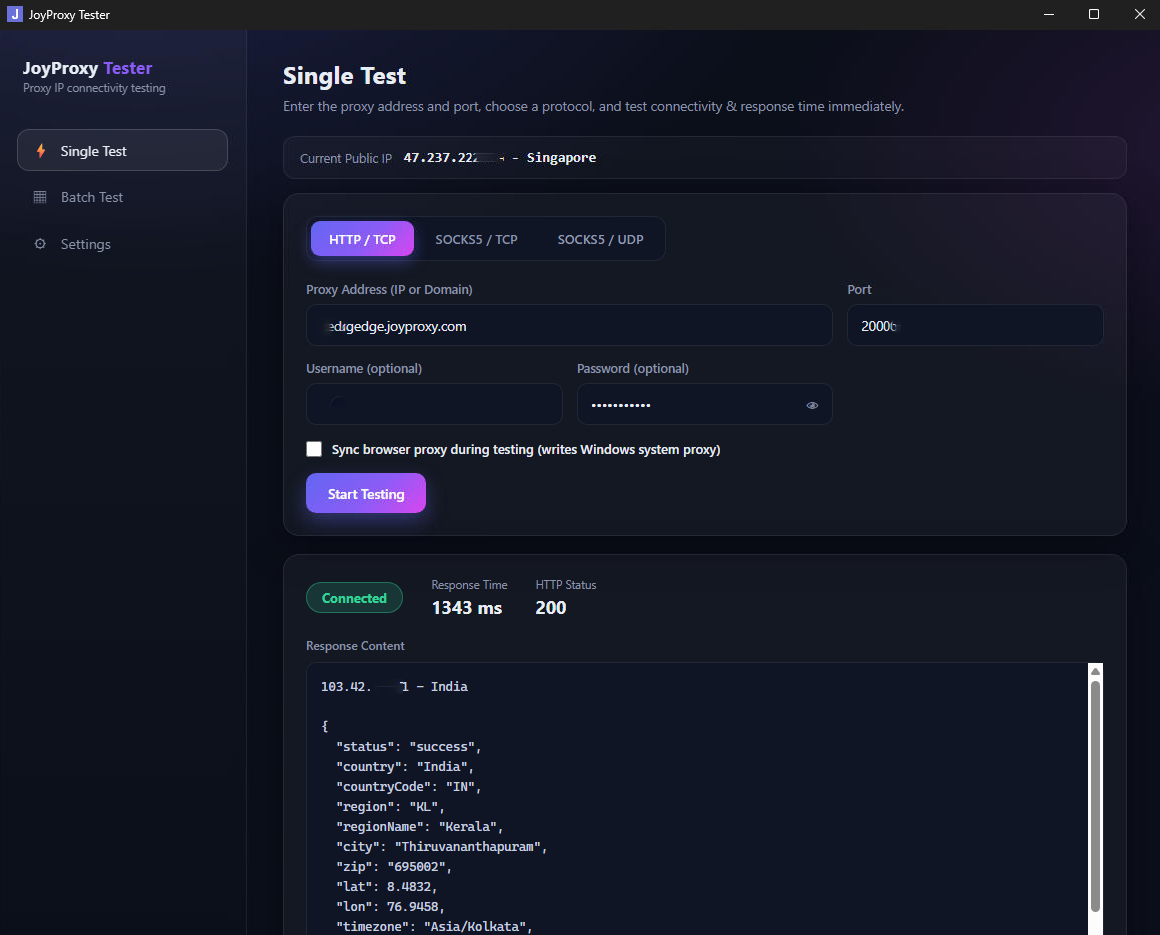
Verification Steps:
- Launch JoyProxy Tester and open Single Test;
- Select the protocol: HTTP or SOCKS5;
- Paste your gateway address and port (e.g.,
192.168.1.100:8080, oruser:pass@192.168.1.100:8080if password protection is enabled); - Click Start Test.
The utility executes TCP handshakes and HTTP CONNECT tunnel negotiation within milliseconds, querying multiple international geolocation registries. The dashboard displays:
- Handshake Latency: Round-trip timing to your proxy gateway;
- Egress IP & Geographic Resolution: Confirms outbound routing reflects your gateway host or upstream residential node;
- Protocol Health: Validates both TCP transmission and SOCKS5 UDP relay capabilities.
A clean green status confirms your gateway is ready for production workloads.
Part 4: Mobile Integration and Selective Routing (JoyProxy Android Client)
Teams managing overseas social media channels (e.g., TikTok, Instagram), mobile ad verification, or cross-regional app QA often need to route physical smartphone traffic through their private gateway.
Configuring proxies inside native Android Wi-Fi settings is prone to dropped UDP packets and lacks selective routing. The JoyProxy Android Client, powered by sing-box libbox, provides an agile mobile solution without requiring root privileges.
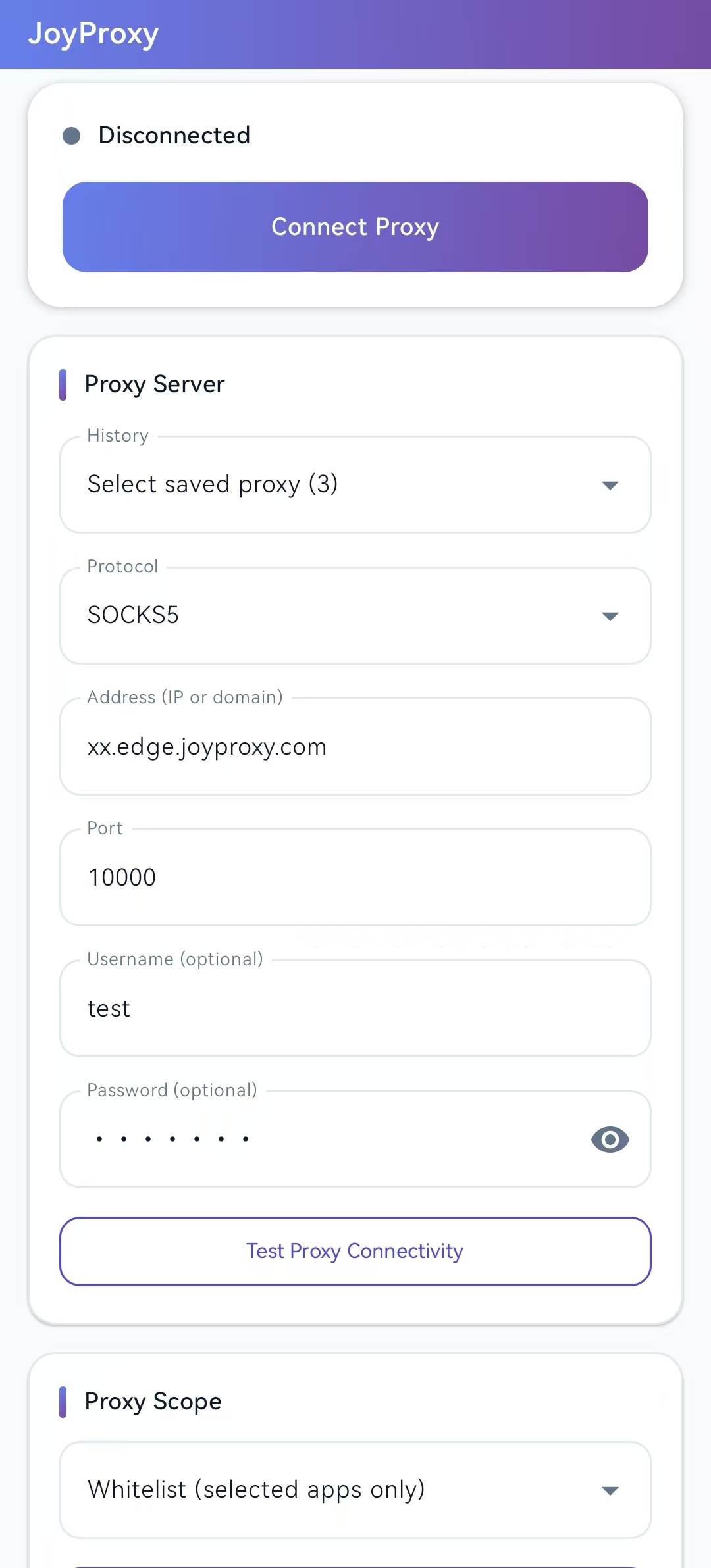
Mobile Configuration and Routing Strategy:
- Install APK: Download the signed
app-release.apkfrom GitHub and install it on an Android phone or emulator (e.g., LDPlayer, MuMu); no root required; - Configure Node Details: Select HTTP or SOCKS5, enter your gateway's IP address and assigned port;
- Pre-flight Connectivity Check: Tap Test while disconnected to verify direct reachability between the phone and your proxy server;
- Configure Per-App Selective Routing:
- Global Mode: Routes all device traffic through your proxy gateway;
- Whitelist Mode (Recommended): Only checked applications (such as Chrome, TikTok, or seller dashboard apps) route through the proxy. Local messaging, corporate communication tools, and banking apps stay on direct local network connections, avoiding connection drops or account security flags;
- Tap Connect and confirm Android's standard VPN permission prompt. The key icon in the system status bar confirms traffic is successfully routed.
Parameter Reference Matrix
Key deployment flags and operational modes:
| Operational Mode | Core Startup Syntax | Typical Production Use Case |
|---|---|---|
| Open LAN Gateway | -p ":8080" -g "IP" | Shared local proxy for multiple developers in an office |
| Upstream Auth Relay | -p ":8080" -parent "http://u:p@upstream:9001" | Adapts password-free legacy scraping tools to authenticated proxies |
| Port Range Gateway | -p ":5001-5010" | Maps dedicated ports to distinct team members or scraping threads |
| Persistent Daemon | --daemon --forever | Background operation with automated crash recovery |
| Systemd Service | --no-detach | For systemd service units requiring a non-forking foreground process |
| Rate Throttling | --max-conns-rate 100 | Caps new connections per second to protect upstream bandwidth |
Official Software & Documentation Links:
- Server Binary & Documentation: JoyProxy Server Details · GitHub Repository
- Desktop Validation Tool: JoyProxy Tester Details · GitHub Releases
- Android Client: JoyProxy Android Client Details · APK Downloads
- Upstream Residential & ISP IP Plans: Explore JoyProxy Residential Proxies · View Real-Time Pricing Plans