Proxy Server

JoyProxy Server

High-performance HTTP / SOCKS5 proxy gateway for Linux and Windows. Five startup modes, optional external auth and traffic APIs.

Prebuilt Binaries

Download prebuilt Linux and Windows binaries from GitHub. No compilation required.

Linux

amd64 binary and CentOS 7 tarball from GitHub Releases.

Windows

joyproxy-gui.exe includes a desktop UI; joyproxy.exe is the command-line gateway.

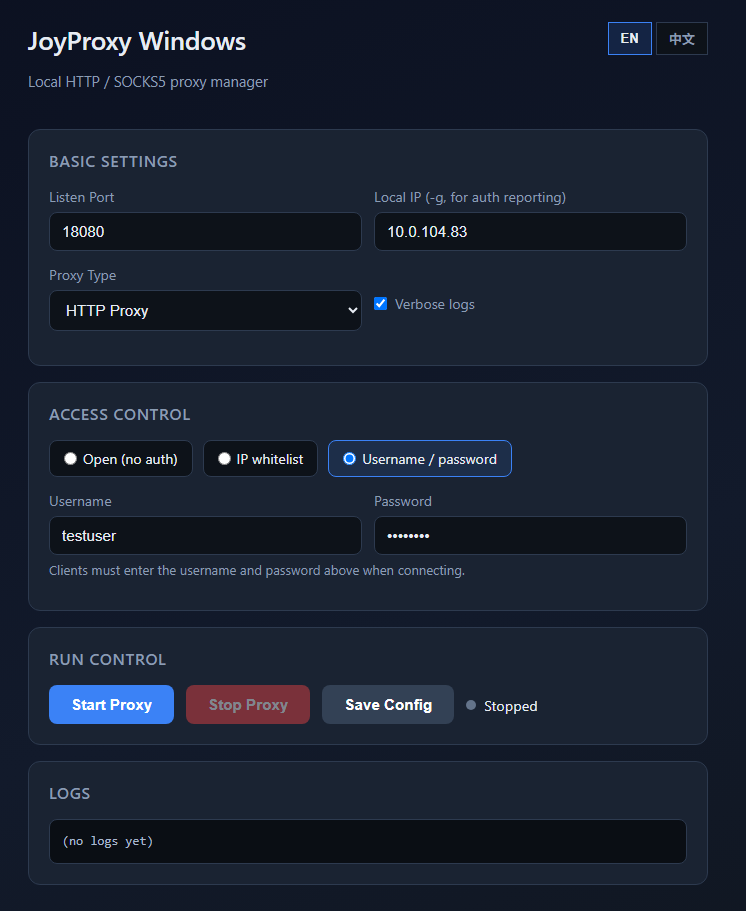
Desktop Proxy Manager

joyproxy-gui.exe offers a visual interface for listen port, auth modes, start/stop controls, and live logs — no command line required.

⚙️

Basic & Auth Settings

Configure listen port, local IP, proxy type, and open / whitelist / password modes in one place.

▶️

One-Click Run Control

Start, stop, and save config with clear running status feedback.

📋

Built-in Log Viewer

Watch proxy activity in real time without opening a separate terminal.
Command-Line Flags

Run ./joyproxy sps -h to show all flags. Common options:

FlagRequiredDescription
-SNoUpstream relay type: http or socks5
-pYesListen port(s), e.g. :8080 or :5001-5999
-gRecommendedPublic IP; used as local_addr when calling auth API
-parentNoDefault upstream if auth API does not return upstream
--auth-urlNoExternal auth API URL
--auth-nouserNoNo client password; API decides per connection
--auth-cacheNoAuth success cache TTL (seconds)
--auth-fail-cacheNoAuth failure cache TTL (seconds)
--traffic-urlNoExternal traffic reporting API URL
--daemonNoRun in background
--foreverNoWith --daemon: auto-restart on crash
--no-detachNoWith --daemon: stay attached (systemd)
--verboseNoFull logs
--quietNoErrors only
--max-conns-rateNoGlobal max new connections per second
--sniff-domainNoSniff TLS SNI on HTTP CONNECT
./joyproxy sps -h
./joyproxy sps -S http -p ":8080" -g "YOUR_PUBLIC_IP"

Server Capabilities

Production-ready proxy gateway for your infrastructure

🔀

Dual Protocol

HTTP and SOCKS5 on configurable ports.

🔐

Flexible Auth

Open proxy, whitelist API, password, or external API.

📊

Traffic API

Optional async traffic reporting.

Rate Limits

Per-user and global connection limits.

🔄

Daemon Mode

Background mode with auto-restart.

🔍

TLS SNI Sniffing

Optional domain sniffing on HTTP CONNECT.

Five Authorization Modes

Choose the mode that fits your deployment

1. Open Proxy (no password)

No --auth-url. Anyone who can reach the port may use the proxy without credentials.

./joyproxy sps -S http -p ":8080" -g "YOUR_PUBLIC_IP"

2. Whitelist Authorization

Use --auth-nouser + --auth-url. Your API decides allow/deny per connection.

./joyproxy sps -S http -p ":8080" -g "YOUR_PUBLIC_IP" \
  --auth-nouser --auth-url "https://your-api.example.com/auth"

3. Username / Password

Clients must send Proxy-Authorization or SOCKS5 credentials. Returns 407 if missing.

./joyproxy sps -S http -p ":8080" -g "YOUR_PUBLIC_IP"

4. External Auth API

Optional --auth-url sends HTTP GET to your endpoint for each connection.

./joyproxy sps -S http -p ":8080" -g "YOUR_PUBLIC_IP" \
  --auth-url "https://your-api.example.com/auth"

5. External Traffic API

Optional --traffic-url receives async reports when connections end.

./joyproxy sps -S http -p ":8080" -g "YOUR_PUBLIC_IP" \
  --auth-nouser --traffic-url "https://your-api.example.com/traffic"

External Auth API Reference

Query parameters sent with each connection:

ParameterDescription
userClient username
passClient password
client_addrClient IP:port
local_addrProxy listen IP:port
targetDestination URL or host:port
servicehttp or socks
spsAlways 1

Response: 200/204 with upstream header to allow; upstream: ERR or non-200 to deny.

Response HeaderDescription
upstreamUpstream proxy URL
outgoingBind source IP hint
userconns / ipconnsMax concurrent connections
userrate / iprateBandwidth bytes/s per connection
userqps / ipqpsMax new connections per second

External Traffic API Reference

Async HTTP GET sent when each connection ends. Return 204 No Content.

ParameterDescription
acttraffic
bytesTotal bytes (up + down)
client_addrClient IP:port
server_addrProxy service IP:port
target_addrTarget host or IP:port
usernameProxy auth username
upstreamUpstream URL used
out_local_addrOutbound TCP local address
out_remote_addrOutbound TCP remote address
idhttp or socks
sniff_domainTLS SNI (--sniff-domain)

Daemon & systemd

Use --daemon --forever for production. With systemd, add --no-detach.

./joyproxy sps -S http -p ":5001-5999" -g "YOUR_PUBLIC_IP" \
  --auth-nouser --daemon --forever

# systemd unit: add --no-detach

Request Flow

Client connects to joyproxy-server; server optionally calls your auth API before relaying traffic.

Deploy on Your Server

Download the binary, configure your startup mode, and start accepting connections.

Download Binary