Linux और Windows के लिए उच्च-प्रदर्शन HTTP / SOCKS5 proxy gateway। पाँच startup modes, वैकल्पिक external auth और traffic API।
GitHub से prebuilt Linux और Windows binaries डाउनलोड करें। compilation की आवश्यकता नहीं।
joyproxy-gui.exe में desktop UI शामिल है; joyproxy.exe command-line gateway है।
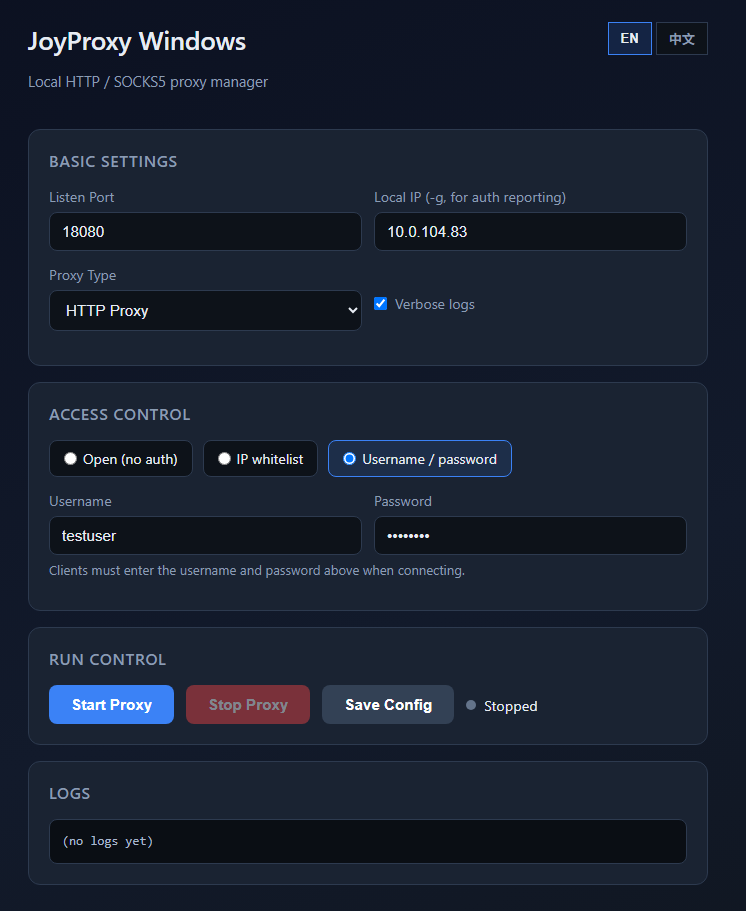
joyproxy-gui.exe listen port, auth modes, start/stop controls और live logs के लिए visual interface प्रदान करता है — command line की आवश्यकता नहीं।
listen port, local IP, proxy type और open / whitelist / password modes एक जगह कॉन्फ़िगर करें।
स्पष्ट running status feedback के साथ start, stop और config save करें।
अलग terminal खोले बिना real time में proxy activity देखें।
सभी flags देखने के लिए ./joyproxy sps -h चलाएँ। सामान्य विकल्प:
| Flag | आवश्यक | विवरण |
|---|---|---|
-S | नहीं | Upstream relay type: http या socks5 (default http) |
-p | हाँ | Listen port(s), जैसे :8080 या :5001-5999 |
-g | अनुशंसित | इस सर्वर का public IP; auth API कॉल करते समय local_addr के रूप में उपयोग |
-parent | नहीं | Default upstream URL यदि auth API upstream नहीं लौटाता |
--auth-url | नहीं | External auth API URL (वैकल्पिक) |
--auth-nouser | नहीं | Clients username/password नहीं भेजते; API प्रति connection decide करता है |
--auth-cache | नहीं | Auth success cache TTL सेकंड में |
--auth-fail-cache | नहीं | Auth failure cache TTL सेकंड में |
--traffic-url | नहीं | External traffic reporting API URL (वैकल्पिक) |
--daemon | नहीं | बैकग्राउंड में चलाएँ (shell तुरंत लौटता है) |
--forever | नहीं | --daemon के साथ: crash पर worker auto-restart |
--no-detach | नहीं | --daemon के साथ: attached रहें (systemd के साथ उपयोग करें) |
--verbose | नहीं | पूर्ण logs |
--quiet | नहीं | केवल errors |
--max-conns-rate | नहीं | प्रति सेकंड global max new connections (0 = unlimited) |
--sniff-domain | नहीं | HTTP CONNECT पर TLS SNI sniff करें |
./joyproxy sps -h
./joyproxy sps -S http -p ":8080" -g "YOUR_PUBLIC_IP"
आपके infrastructure के लिए production-ready proxy gateway
कॉन्फ़िगर करने योग्य single port या port range पर HTTP और SOCKS5।
Open proxy, whitelist API, username/password, या full external auth API।
connections समाप्त होने पर वैकल्पिक async traffic reporting।
प्रति-उपयोगकर्ता connection limits, bandwidth caps और global connection rate limit।
production deployments के लिए auto-restart के साथ background mode।
HTTP CONNECT पर वैकल्पिक domain sniffing।
अपने deployment के अनुकूल mode चुनें
कोई --auth-url नहीं। जो भी port तक पहुँच सके, credentials के बिना proxy उपयोग कर सकता है।
./joyproxy sps -S http -p ":8080" -g "YOUR_PUBLIC_IP"
--auth-nouser + --auth-url उपयोग करें। Clients password नहीं भेजते; आपका API प्रति connection allow/deny decide करता है (IP whitelist, target whitelist, आदि)।
./joyproxy sps -S http -p ":8080" -g "YOUR_PUBLIC_IP" \
--auth-nouser --auth-url "https://your-api.example.com/auth"
--auth-nouser उपयोग न करें। Clients को Proxy-Authorization (HTTP) या SOCKS5 credentials भेजने होंगे। missing होने पर 407 लौटता है। --auth-url के बिना, credentials केवल locally check होते हैं (non-empty)।
./joyproxy sps -S http -p ":8080" -g "YOUR_PUBLIC_IP"
वैकल्पिक --auth-url प्रत्येक connection के लिए आपके endpoint पर HTTP GET भेजता है। --auth-nouser के साथ या बिना combine करें।
./joyproxy sps -S http -p ":8080" -g "YOUR_PUBLIC_IP" \
--auth-url "https://your-api.example.com/auth"
वैकल्पिक --traffic-url प्रत्येक connection समाप्त होने पर async HTTP GET भेजता है। आपका API 204 No Content लौटाना चाहिए। auth API के साथ combine किया जा सकता है।
./joyproxy sps -S http -p ":8080" -g "YOUR_PUBLIC_IP" \
--auth-nouser --traffic-url "https://your-api.example.com/traffic"
जब --auth-url set हो, joyproxy प्रत्येक connection के लिए इन query parameters के साथ HTTP GET भेजता है:
| Parameter | विवरण |
|---|---|
user | Client username (--auth-nouser होने पर empty) |
pass | Client password |
client_addr | Client address IP:port |
local_addr | Proxy listen address IP:port (-g + listen port से) |
target | Destination: HTTP URL या SOCKS5 के लिए host:port |
service | http या socks |
sps | हमेशा 1 |
आपका API 200 या 204 और header upstream: http://... या socks5://... के साथ allow के लिए respond करना चाहिए। deny के लिए upstream: ERR या non-200/204 लौटाएँ (client को 503, या X-Joyproxy-Reject-Status / X-Joyproxy-Deny के माध्यम से 407/429)।
| Response Header | विवरण |
|---|---|
upstream | इस connection के लिए upstream proxy URL |
outgoing | Bind source IP hint |
userconns / ipconns | Max concurrent connections (प्रति user) |
userrate / iprate | प्रति-connection bandwidth bytes/s (प्रति user) |
userqps / ipqps | Max new connections प्रति सेकंड (प्रति user) |
जब --traffic-url set हो, joyproxy प्रत्येक connection समाप्त होने पर async HTTP GET भेजता है। आपका API 204 No Content लौटाना चाहिए।
| Parameter | विवरण |
|---|---|
act | traffic |
bytes | कुल bytes transferred (up + down) |
client_addr | Client IP:port |
server_addr | Proxy service IP:port |
target_addr | Target host या IP:port |
username | Proxy auth username (यदि कोई) |
upstream | उपयोग किया upstream URL (यदि कोई) |
out_local_addr | Outbound TCP local address |
out_remote_addr | Outbound TCP remote address |
id | http या socks |
sniff_domain | TLS SNI (केवल --sniff-domain enabled होने पर) |
production के लिए --daemon --forever उपयोग करें। systemd के साथ, --no-detach जोड़ें ताकि main process तुरंत exit न हो।
./joyproxy sps -S http -p ":5001-5999" -g "YOUR_PUBLIC_IP" \
--auth-nouser --daemon --forever
# systemd unit: add --no-detach
Client joyproxy-server से connect करता है; traffic relay करने से पहले सर्वर वैकल्पिक रूप से आपका auth API कॉल करता है।
Recent releases. Full list on GitHub.
Auth API must return socks5:// (not http://) for service=socks / SOCKS5 UDP sessions.
Binary डाउनलोड करें, startup mode कॉन्फ़िगर करें, और connections स्वीकार करना शुरू करें।
Binary डाउनलोड करें